9/21update!! OBS配信音声を『聞きやすく』『簡単キレイに』 Kirei.vst3 — OBS Voice Processing Plugin for Streamers & VTubers
- ダウンロード商品¥ 5,000
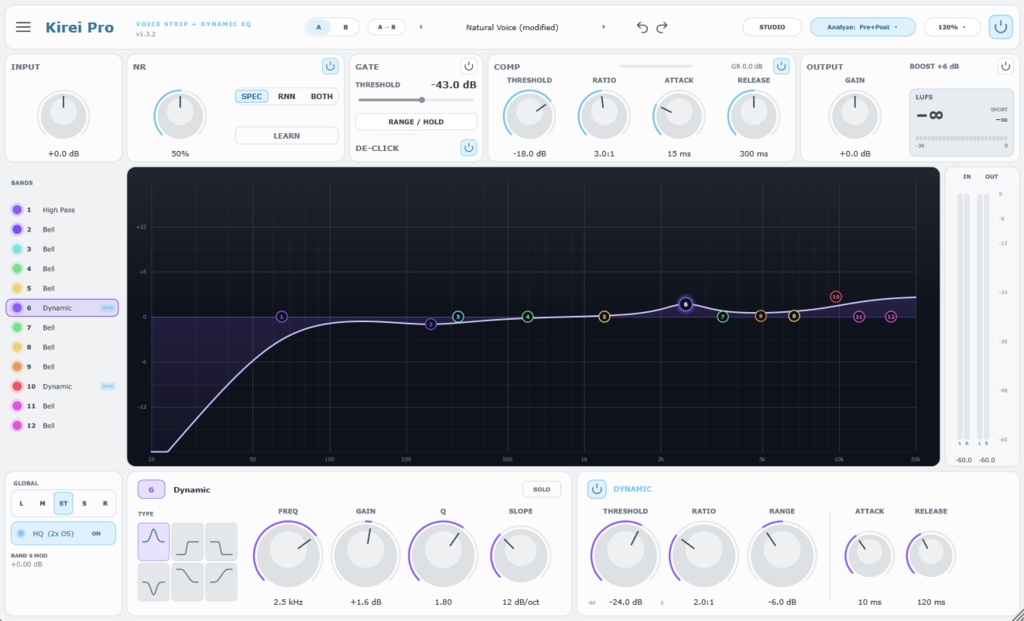
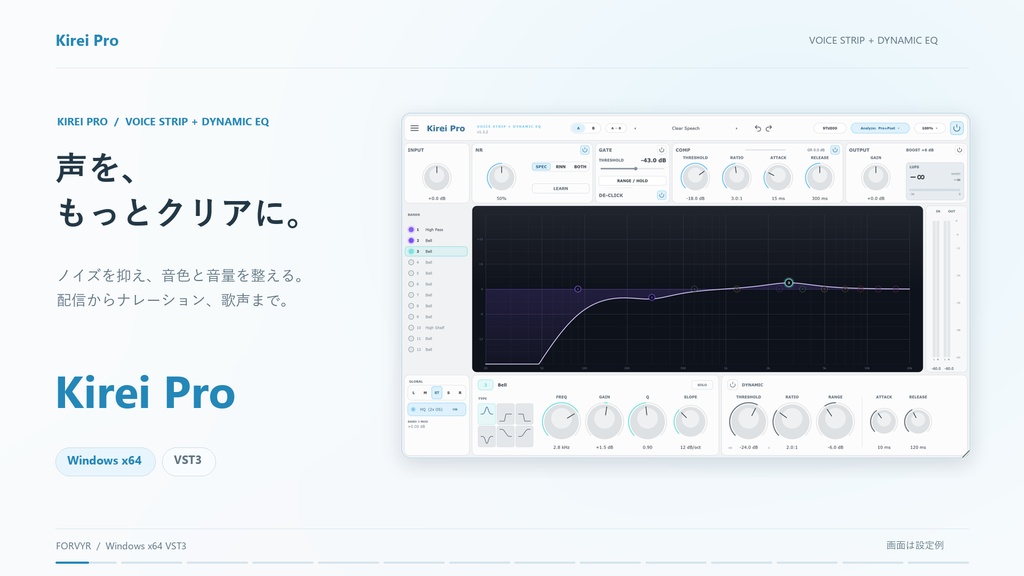
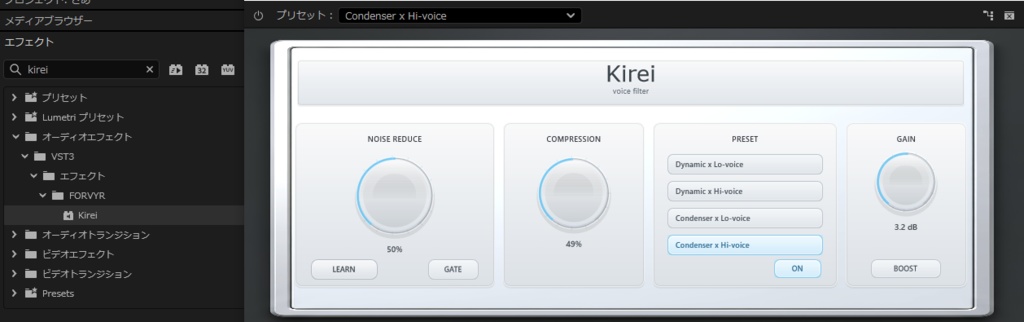
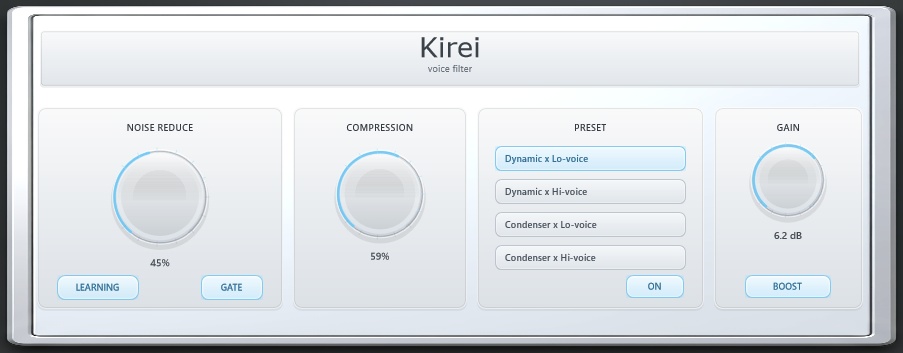
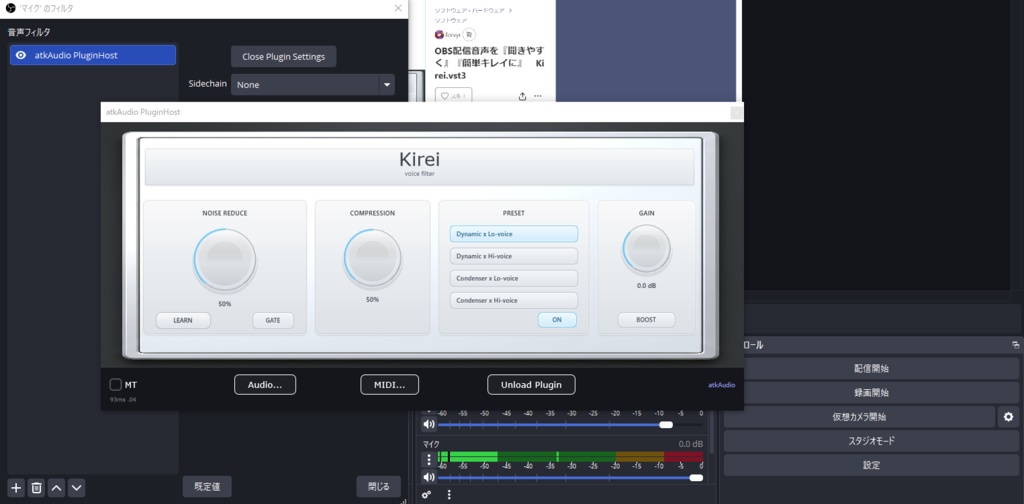
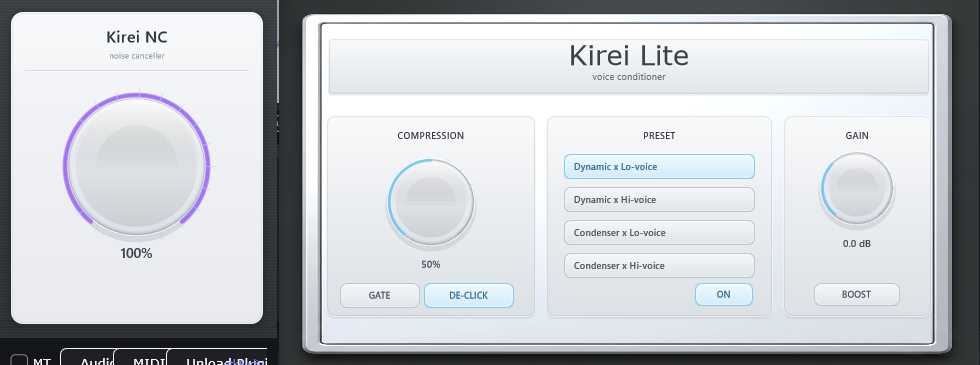
✅9/21 kirei Proを同梱しました! 多数の機能を追加しており Kireiより詳細に音を作り込みたい方向けです! ✅ 3/23 軽量版 Kirei Lite.vst3 と、 ホワイトノイズ対策向けの Kirei NCを追加しました。 Kirei Liteは、ノイズ抑制機能を省いた低遅延・軽量版です。 Kirei NCは、周辺のノイズを目立ちにくくするための補助機能を搭載した版です。 ================================ KIREI.VST3 OBS配信 音声を「聞きやすく」「簡単キレイに」 kirei.vst3 は、 主にOBSでゲーム配信・雑談配信をする方向けに作成した、 音声調整用オールインワンプラグインです。 ━━━━━━━━━━━━━━━━━━ ■ こんなお悩みに ━━━━━━━━━━━━━━━━━━ ・サーっというホワイトノイズが気になる ・声がこもる、または少しキンキンする ・声の音量が小さく、ゲーム音やBGMに埋もれる ・大きい声を出した時に音が割れやすい ・OBSの音声フィルター設定が難しく感じる こういった悩みは、本来であれば、 ゲート、EQ、コンプレッサー、リミッターなどを組み合わせて 細かく調整する必要があります。 ただ実際には、 「何をどう設定すればいいかわからない」 「触れば触るほど逆に変になる」 「複数のフィルターを管理するのが大変」 という方も多いと思います。 kirei.vst3 は、そんな配信時の音声調整を、 できるだけ簡単に、できるだけ自然に、 聞きやすい方向へ整えやすくすることを目的に制作しました。 複数の基本的な音声処理を1つにまとめているので、 「難しい設定はなるべく減らしたいけど、音質では妥協したくない」 そんな方におすすめです。 ━━━━━━━━━━━━━━━━━━ ■ 特徴 ━━━━━━━━━━━━━━━━━━ 【1】ノイズ抑制 常時発生するホワイトノイズや、 無音時に目立ちやすい「サーっ」という音を できるだけ目立ちにくくするための補助機能です。 配信環境やマイクの状態に合わせて、 ノイズ感を抑えた聞きやすい音作りをサポートします。 ※キーボード音、マウス音、生活音、周囲の話し声などを 完全に消すことを目的とした機能ではありません。 【2】ゲート 小さな余分なノイズを抑え、 無音時の不要音を整理します。 話していない時のノイズ感を減らしたい方に向いています。 【3】コンプレッサー 音量差を自然に整え、 声をより聞き取りやすくします。 小さい声は埋もれにくく、 大きい声は暴れすぎないように補正します。 【4】EQプリセット 難しい細かな音作りを分かりやすくするため、 マイクの種類や声質に合わせやすい 4種類のプリセットを用意しています。 「こもる」「刺さる」などの悩みを、 直感的に調整しやすくしています。 【5】ゲイン 音量は最大 +12dB まで増幅可能。 さらに、手軽に音量感を持ち上げたい方向けに ワンボタンで音量が上がるBOOSTボタンも搭載しています。 【6】リミッター 急な大声やピーク時の音割れを防ぐ リミッターを搭載。 ゲーム中のリアクションや盛り上がった場面でも、 破綻しにくい音作りをサポートします。 上記エフェクトを1つにまとめたプラグインとなっております。 ━━━━━━━━━━━━━━━━━━ ■ こんな方におすすめ ━━━━━━━━━━━━━━━━━━ ・OBSでゲーム配信、雑談配信をしている方 ・音質を改善したいけど設定が難しいと感じる方 ・できるだけ簡単に聞きやすい声へ近づけたい方 ・複数フィルターを何個も管理したくない方 ・配信の印象を、音の面から底上げしたい方 ・ホワイトノイズや無音時のノイズ感を少しでも抑えたい方 --- 🌏 English Description KIREI.VST3 Make your OBS stream audio cleaner, clearer, and easier to manage. kirei.vst3 is an all-in-one voice processing plugin designed mainly for OBS streamers, especially for gaming streams and chatting streams. It was created for people who want to improve their stream voice without having to manage many separate filters or complicated audio settings. ━━━━━━━━━━━━━━━━━━ ■ What problems does it help with? ━━━━━━━━━━━━━━━━━━ Constant background hiss or white noise A muddy or overly sharp voice tone Low voice volume that gets buried in game audio or BGM Distortion when your voice gets too loud Confusing OBS audio filter settings Normally, fixing these issues requires stacking multiple filters and adjusting each one carefully. But many users run into problems like: “I don’t know what to change.” “The more I tweak it, the worse it sounds.” “Managing multiple filters is too complicated.” That is why kirei.vst3 was made. It helps make stream audio easier to adjust in a simple, natural, and listener-friendly way. By combining several basic voice processing tools into one plugin, kirei.vst3 is a good fit for people who want better audio with less setup. ━━━━━━━━━━━━━━━━━━ ■ Features ━━━━━━━━━━━━━━━━━━ [1] Lightweight Noise Reduction Helps reduce the noticeable hiss or constant white noise that can be heard during silent moments. This feature is designed to make background noise less distracting and support a cleaner stream voice. Please note that this is not an AI voice separation tool and is not intended to completely remove keyboard sounds, room noise, background voices, or other environmental sounds. The result may vary depending on your microphone, room environment, OBS settings, and other audio software. [2] Gate Reduces small unwanted sounds when you are not speaking. Useful for making silent moments feel cleaner and less noisy. [3] Compressor Smooths out volume differences naturally so your voice is easier to hear. Quiet parts stay more present, while loud parts are kept under control. [4] EQ Presets Includes 4 EQ presets to make tone adjustment easier depending on your microphone and voice. It helps with common tone problems such as muddiness, harshness, or a voice that feels too thin. [5] Gain Boost your volume by up to +12 dB. A one-button BOOST function is also included for users who want a quick and simple volume lift. [6] Limiter Helps prevent clipping and distortion during sudden loud moments. Useful for excited reactions, shouting, or peak moments during a stream. All of these effects are combined into one OBS-friendly voice processing plugin. ━━━━━━━━━━━━━━━━━━ ■ Recommended for ━━━━━━━━━━━━━━━━━━ OBS streamers who do gaming or chatting streams People who want better audio but find audio settings confusing People who want an easier way to make their voice cleaner and more listenable People who do not want to manage multiple separate filters People who want to improve the overall quality of their stream through better sound People who want to reduce noticeable hiss or white noise during silent moments ━━━━━━━━━━━━━━━━━━ ■ Notes ━━━━━━━━━━━━━━━━━━ This plugin is a support tool for making stream audio easier to listen to. It does not completely remove all noise. The result may vary depending on your microphone, audio interface, OBS settings, PC environment, room environment, and other audio processing tools. When using the noise reduction function, some latency or sound quality changes may occur depending on your environment. If low latency is your priority, please consider using Kirei Lite.vst3. Demo: https://youtu.be/iqCoCUoDT9k
ご購入前にご確認ください
・本商品は Windows専用です ・macOSでは使用できません、間違えてご購入いただいた場合も返金対応等はできません。 ・VST3形式専用です ・ご利用ソフトがVST3プラグインの読込に対応している必要があります ・ノイズ抑制の仕様上、遅延が多少発生します。自分の声を聞きながら配信したい方、歌枠を主とする方は用途に応じて検討してください。 ・本機のノイズ抑制はキーボードの打鍵音やまわりの音を抑制するタイプではありません。
導入手順(Windows / VST3)
〖1〗ダウンロード ご購入後、BOOTHの購入履歴または商品ページから 配布ZIPをダウンロードしてください。 ◆kirei.zip 〖2〗ZIPを解凍 ダウンロードしたZIPを右クリックし、 「すべて展開」などで解凍してください。 〖3〗VST3フォルダへ配置 解凍後に出てきた kirei.vst3 を 以下のフォルダへコピーまたは移動してください。 C:\Program Files\Common Files\VST3 管理者権限の確認が表示された場合は、 内容を確認のうえ許可してください。 〖4〗OBSまたは対応ソフトを起動 OBS、またはVST3対応ソフトを起動してください。 OBS単体では使用できないため、 別途 atkAudioPlugin for OBSなどの VST3ホスト系プラグインを併用してください。 必要に応じてOBSのアップデート、プラグインの再スキャンを行ってください。 〖5〗プラグインを読み込む VST3プラグイン一覧に kirei.vst3 が表示されていれば導入完了です。 OBSで使用する場合は、音声フィルター欄からホストプラグインを追加し、 その中でkirei.vst3を読み込んでください。 〖6〗引渡時期 / ご利用前のお願い 本商品はデジタルダウンロード商品です。 決済完了後、BOOTHの購入履歴または商品ページよりダウンロードできます。 ご利用前に、必要に応じて OBS設定、ホストアプリ設定、プロジェクトファイル、 その他重要データのバックアップを取得してください。 〖補足〗 ・本商品は VST3形式 / Windows専用 です ・macOS / AU / VST2 には対応していません ・ソフト側の仕様により表示や導入手順が異なる場合があります
注意事項・免責・利用条件
〖1〗動作保証について 本商品はWindows向けに制作されていますが、 すべてのPC環境、OBSバージョン、OSバージョン、 オーディオ設定、他プラグインとの併用環境での正常動作を保証するものではありません。 【動作確認済み環境】 ・OS: Windows 10 / Windows 11(64bit) ・OBS Studio: バージョン 30.0 以降 ・オーディオサンプルレート: 48kHz 上記環境にて基本動作を確認しています。 上記以外の環境では意図した効果が得られない場合や、 正常に動作しない場合があります。 また、音質改善効果には マイク、オーディオインターフェース、配信環境、 話し方、入力レベル、使用ソフト等により個人差があります。 〖2〗サポートおよびアップデート 不具合報告や問い合わせには、 可能な範囲で任意に対応する場合があります。 ただし、サポート対応、修正対応、 アップデート提供、機能追加、互換性維持は保証しません。 〖3〗不具合時の初期対応 配布ファイルの破損、欠落、明らかな起動不能など 商品自体に重大な不備が確認された場合は、 内容確認のうえ、修正版の提供、再配布、 回避方法の案内等、可能な範囲で対応します。 ただし、購入者固有の環境に起因する不具合、 他社製ソフトや他プラグインとの競合、 設定差異による動作不良、 データ復旧、環境復旧、個別設定代行については保証しません。 〖4〗返品・返金 本商品はデジタルコンテンツのため、 購入後の返品、返金、交換、キャンセルには対応しません。 ご購入前に、商品説明、対応環境、利用条件を必ずご確認ください。 法令上返金が義務付けられる場合を除き、返金対応は行いません。 〖5〗損害および責任の範囲 本商品の利用または利用不能に関連して生じた損害について、 制作者は以下の範囲で責任を負います。 ・制作者の故意または過失により本商品に起因して生じた直接損害に限り、 購入代金額を上限として賠償します。 ・間接損害、逸失利益、データ消失、設定破損、機器不調、 業務中断その他の間接的損害については、 制作者の故意または重過失がある場合を除き、責任を負いません。 ・購入者のPC環境、設定、他ソフトウェアとの相性に起因する 不具合については、責任を負いかねます。 〖6〗著作権および権利帰属 本商品、本プラグイン、付属データ、文書、 関連ファイルに関する著作権その他一切の権利は制作者に帰属します。 購入者は所有権を取得するものではなく、 本規約の範囲内で利用するための限定的な使用権のみを得るものとします。 〖7〗利用許諾範囲 本商品は購入者本人のみ利用できます。 購入者本人が自身の配信、動画投稿、録音、 収益化配信・収益化動画に使用することは可能です。 ただし、以下の利用は認められません。 ・第三者への共有を前提とした利用 ・団体内でのライセンス共有 ・購入者以外への再利用許諾 ・商品そのものを再販売価値のある形で組み込む利用 〖8〗禁止事項 以下の行為を禁止します。 ・再配布、再販売、転売、譲渡、貸与 ・クラウドストレージや共有サービス等へのアップロード ・改変、改造、翻案、書換え ・分解、解析、リバースエンジニアリング、逆コンパイル、逆アセンブル ・内部構造やアルゴリズムの抽出、解析 ・本商品をもとにした派生物、類似物、複製物の作成 ・権利表示や注意書きの削除、改変 ・法令または公序良俗に反する利用 ・制作者または本商品の信用を毀損する行為 ・その他、制作者が不適切と判断する行為 〖9〗規約違反時の措置 購入者が本規約に違反した場合、 制作者は通知なく利用許諾を終了できるものとします。 その場合、購入者は直ちに使用を中止し、 保有データを削除するものとします。 〖10〗規約変更 制作者は必要と判断した場合、 本規約を予告なく変更できるものとします。 変更後の規約は、 商品ページ等に掲載した時点で効力を生じるものとします。
アップデート履歴
[2026-03-23: Kirei_Windows_VST3_v1.1.0] Kirei Lite.vst3、KireiNC.vst3 追加 [2026-03-10: Kirei_Windows_VST3_v0.1.0] release